Stop finding out at month-end that half your unit went quiet.
See who is active this week, who is slipping, and whether the month is on pace. Your advisors log their activity in one tap on their phone. Hindi na kailangang mag-chase sa GC.
No credit card at signup. Setup takes a few minutes. Free for your advisors.
Sound familiar?
- You ask "Kumusta ang activity natin this week?" in the group chat. A few thumbs up, zero numbers.
- An advisor goes quiet for two or three weeks, and you only notice when production comes in at month-end.
- You are the only one updating the activity spreadsheet, usually on a Sunday night.
- In the Monday huddle you are guessing who really did their approaches and presentations.
What waiting until month-end costs you
Activity comes before production. When you only see production, you see problems weeks late. By then the month is closed, the advisor who drifted is harder to bring back, and your time went to chasing updates instead of coaching.
Say one advisor in your unit usually closes one case a month at ₱30,000 APE. If they drift for a month and nobody notices, that is a ₱30,000 APE month that may not happen, before counting the effect on their own momentum.
Unit Pulse costs ₱799 a month for the whole unit after the free pilot. Advisors are free. Your numbers will be different, so run the math with your own unit.
Now picture a normal Monday with Unit Pulse
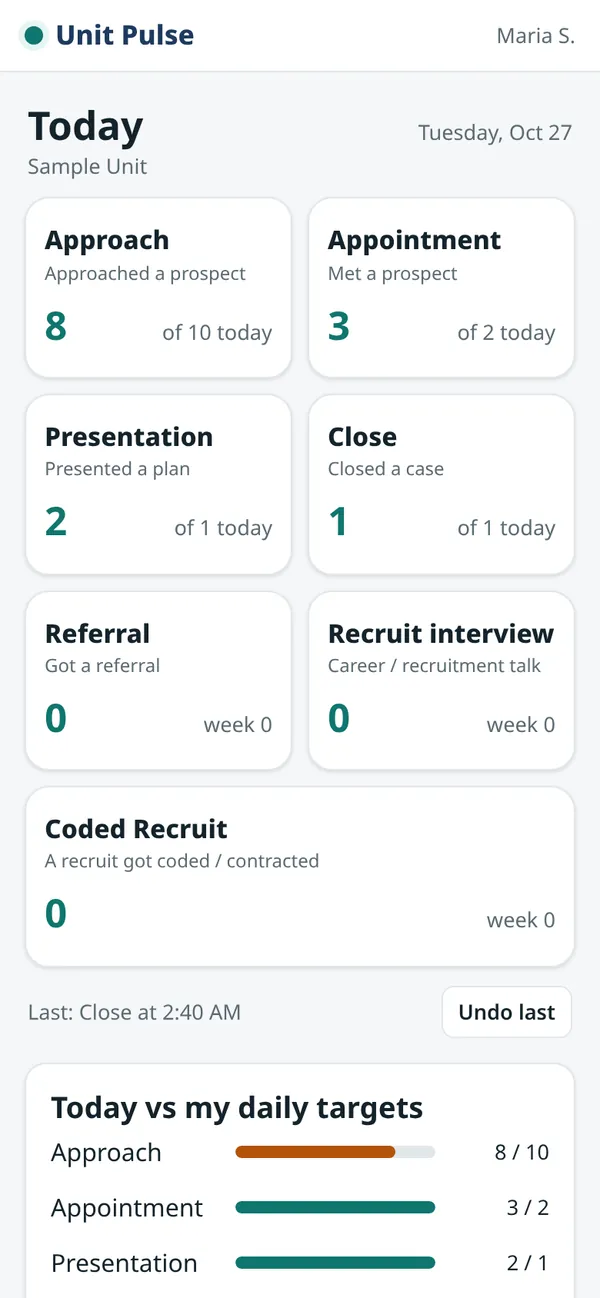
- Your team logs as they go. Approaches, appointments, presentations, closes, referrals, recruit interviews. One tap each, right after it happens.
- You get an early warning. A "gone quiet" list shows who has had no activity for 7, 14 or 21 days, so you can check in this week, not next month.
- A leaderboard your team can see. Every advisor sees the unit ranking on their phone by day, week, month or year: activity points, plus APE and cases. Healthy competition, without you posting reminders.
- You know if the month is on pace. APE and cases your advisors log themselves (verified with your official monthly figure when you enter it), plus recruit interviews, month to date against your targets, plus optional MDRT progress per advisor.
See inside the app
Real screens, made-up sample names and numbers.
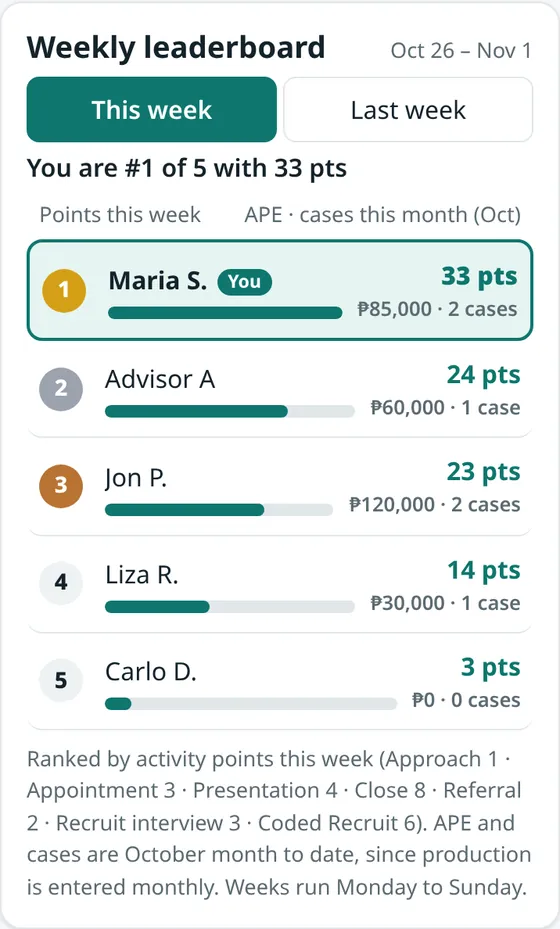
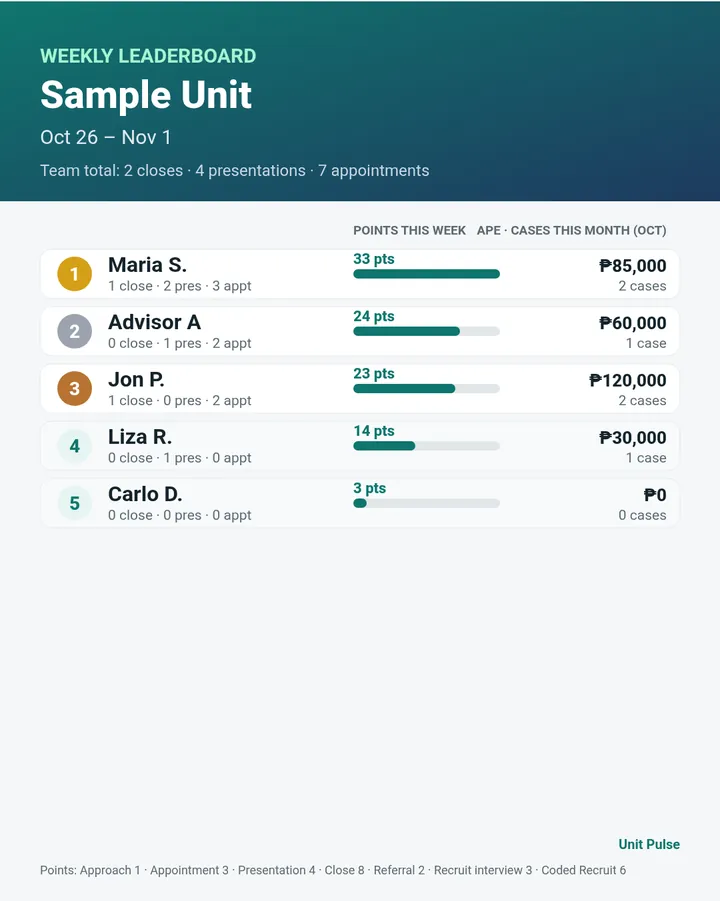
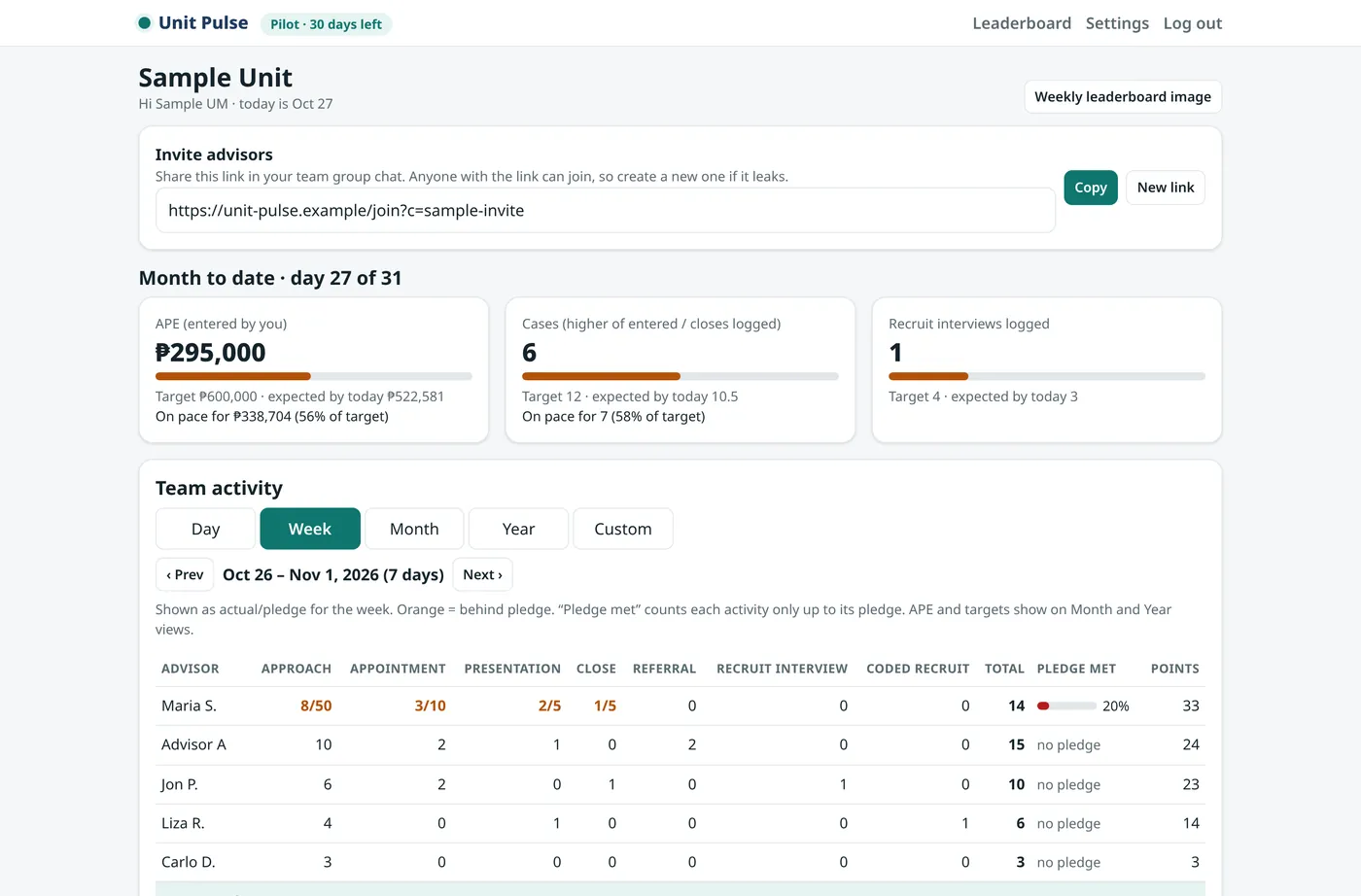
Sample data: made-up names and numbers, shown only to illustrate the app.
Why your advisors will actually use it
- Logging takes seconds. Open the link, tap the button. Undo if they tap by mistake.
- Nothing to install, no password. It works in the phone browser, Android or iPhone. They join from your invite link by typing their name.
- It helps them too. They set their own daily targets and see their progress, plus where they rank this week.
- Libre sila. Advisors never pay. Only the unit manager subscribes, after the pilot, if you decide to keep it.
Set up in minutes
- Create your unit. Sign up with your email, name your unit and set your monthly targets.
- Post the invite link in your GC. Advisors tap it, type their name, and they're in.
- Check your dashboard anytime. A weekly summary is ready every Monday at 8am, Manila time.
Everything you get
| What's included | What it does for your team |
|---|---|
| One-tap activity logger | Advisors record each approach, appointment, presentation, close, referral, recruit interview and coded recruit as it happens. |
| Daily targets and weekly pledge | Each advisor commits to their own numbers and sees their progress. |
| Advisor leaderboard | Day, week, month or year: points, plus APE and cases, visible to everyone in the unit. Pledges and personal targets stay private. |
| Pledge vs actual dashboard | You see who is on track, per activity, without asking. |
| "Gone quiet" early warning | Flags advisors with no activity for 7, 14 or 21 days. |
| Month-to-date pace | APE, cases and recruit interviews against your monthly targets. |
| MDRT progress (optional) | Per-advisor APE year to date against an MDRT target you set. |
| Leaderboard picture | A clean daily, weekly, monthly or yearly image to post in your group chat. |
| Monday weekly digest | A summary of last week, ready on your dashboard. |
| Recruitment pipeline | Track recruits by first name and stage, from lead to coded. |
| Private follow-up reminders | Advisors can note a client's first name and a date. Only that advisor sees it. |
| Export anytime | Download your unit's data as CSV whenever you want. |
Try it with your unit for 30 days, free.
- Free 30-day pilot for your whole unit. No credit card at signup.
- After the pilot: ₱799 / month per unit. Advisors are always free.
- If you don't subscribe after the pilot, you are not charged.
- Cancel anytime from your Billing page, no cancellation fee. Your unit keeps working until the end of the period you paid for.
- Your data stays yours. Export it as CSV or delete your unit anytime.
Unit Pulse is in pilot, so features and the planned price may still change. Works with any insurance company.
Questions
Is my clients' data safe? Ano ang naka-save?
Unit Pulse stores activity counts, not client files. No client names, phone numbers or policy details. The one exception is an optional follow-up reminder where an advisor can write a client's first name, and only that advisor sees it. The app never messages your clients.
Who sees what?
You, as unit manager, see your whole unit. Advisors see their own numbers, plus the unit leaderboard: names, points for the day, week, month or year, and APE and cases. Pledges and personal targets stay private. No one outside your unit sees your data.
Does it work with my insurance company?
Yes. Unit Pulse is an independent tool and works for any life insurance unit. It is not affiliated with any insurer and gives no insurance or financial advice.
What phone do my advisors need?
Any phone with a web browser, Android or iPhone. Nothing to install and no password. They join from your invite link.
How much is it?
Free for 30 days. After that, ₱799 / month per unit, paid by the unit manager. Advisors never pay.
How do I cancel?
Anytime from the Billing section of your dashboard, with no cancellation fee. Your unit keeps working until the end of the period you already paid for. During the pilot there is nothing to cancel: if you don't subscribe, you are not charged.
Where do APE and cases come from?
Advisors add each case they close on their phone: the date, the APE, and an optional short note (no client names). Each entry counts as one case, and these totals are marked “self-reported”. When you have the company report, you can enter the official APE and cases for the month; that month is then marked “verified” and your figure is used. If an advisor adds no cases in a month, the closes they tapped count as cases. You see every entry and change in the advisor's activity log and the CSV export; other advisors only see totals on the leaderboard.
No credit card at signup. Setup takes a few minutes.